TP-Link Deco M4 is a really good Mesh WiFi system and I would recommend buying it without hesitation. It provides whole-home WiFi coverage with an attractive price ($125.99 on Amazon), plus features that even some more expensive Mesh WiFi kits let fall by the wayside, such as fast roaming.
TP-Link Deco M4 Pros and Cons

TP-Link Deco M4 Design
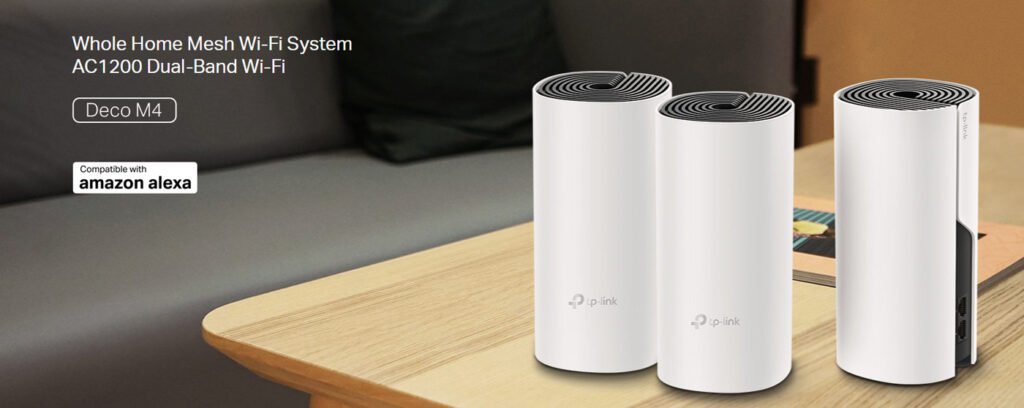
Unlike the discreet, circular nodes of the Deco M9 Plus, the TP-Link Deco M4 uses three tall cylinders, with each one coming in at 90.7 x 90.7 x 190mm and weighing about 800g, for a visually striking – yet surprisingly lightweight—design. The nodes are white with black grilles and on the top also has TP-Link logo and ventilation grilles. The logo would light up in varying colours to reflect the Deco M4’s status. For example, a red logo suggests that a network has been disconnected.
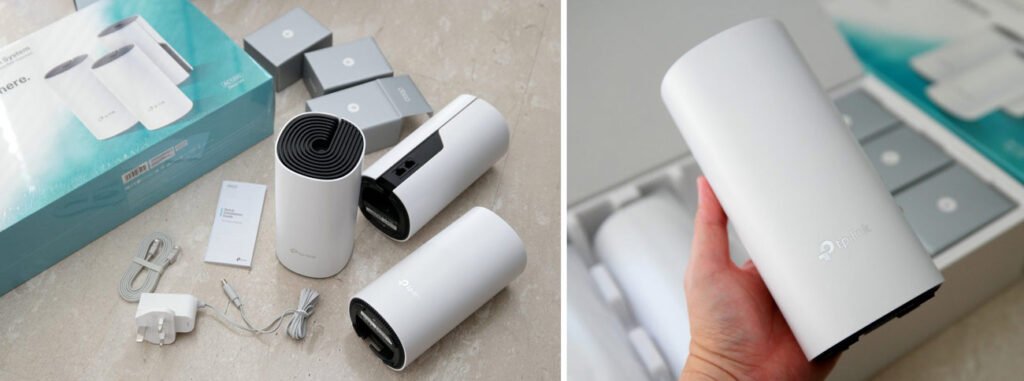
The back of the Deco M4 unit has two 1 Gigabit Ethernet ports, at the bottom along with a power socket and reset button. Additionally, four small rubber feet ensure the unit remains stable when placed on a flat surface. Unfortunately, the Deco M4 station cannot be wall-mounted.
TP-Link Deco M4 Feature
- Dual Band WiFi 5 up to 1167 Mbps WiFi speed for lightning-fast performance on WiFi mesh with Cutting-Edge Mesh Wi-Fi Technology
- Wi-Fi Mesh Boosters for Double the Coverage -Covers up to 1,500 ft² / 140m² with high-speed Wi-Fi, ideal for a large flat or two-storey home
- Connect 100 Devices – Embrace the future of Wi-Fi with our Wi-Fi 5 mesh system, delivering unparalleled performance and efficiency for your home network; Connect up to 100 devices with stability, providing fast and stable connections for all your smart devices and family members
- Compatible for All Deco Node – Seamlessly integrate additional Deco mesh nodes into your network with our mesh technology, expanding coverage and ensuring a seamless Wi-Fi experience
- Easy setup in minutes – Easily manage your home network with the Deco App, allowing you to quickly set up and manage your Wi-Fi
TP-Link Deco M4 Specifications
The TP-Link Deco M4 is powered by a quad-core Qualcomm Atheros QCA9563 processor running at 750 MHz, 128 MB of RAM, and 16 MB of firmware storage. Each Deco M4 unit incorporates two dual-band antennas, utilising the 802.11ac Wave 2 networking standard to deliver 2×2 MU-MIMO wireless transmission.The system delivers a maximum theoretical bandwidth of 300 Mbps on the 2.4 GHz band and 867 Mbps on the 5 GHz band. TP-Link Deco M4 utilises a Bluetooth 4.2 chip to connect to smartphones and other mobile devices. Specifications are as follows:
| Brand | TP-Link |
| Model Name | Deco M4 (3-Pack) |
| Special Feature | Fast Charging |
| Frequency Band Class | Dual-Band |
| Standards and Protocols | Wi-Fi 5 IEEE 802.11ac/n/a 5 GHz IEEE 802.11n/b/g 2.4 GHz |
| WiFi Speeds | AC1200 5 GHz: 867 Mbps (802.11ac) 2.4 GHz: 300 Mbps (802.11n) |
| WiFi Range | 3-5 Bedroom Houses (3-pack) |
| Ethernet Ports | 2× Gigabit Ports |
| Dimensions (W×D×H) | 3.6 × 3.6 × 7.5 in (90.7 × 90.7 × 190 mm) |
| Wireless Communication Standard | 802.11a, 802.11ac, 802.11b, 802.11g, 802.11n |
| Compatible Devices | Personal Computer |
| Package Content | Deco M4 (3-pack) 3 Deco M4R Units 1 RJ45 Ethernet Cable 3 Power Adapters 1 Quick Installation Guide |
TP-Link Deco M4 Performance
The TP-Link Deco M4 router performed well in our throughput performance tests, though the satellite router’s performance was mediocre at best. In my close-range testing (the same room), it scored 480 Mbps, in fact much faster than the Linksys Velop plug-in router, and just a tad slower than the D-Link COVR 2202 router. The TP-Link Deco M9 Plus remains our fastest Wi-Fi system router, scoring 546Mbps. At 30 feet (9 meters), the Deco M4 router took the lead with a score of 342Mbps. That’s compared with the Deco M9 Plus router’s result of 230Mbps,the COVR 2202 router’s result of 210Mbps and the Velop plug-in router’s result of 181Mbps.
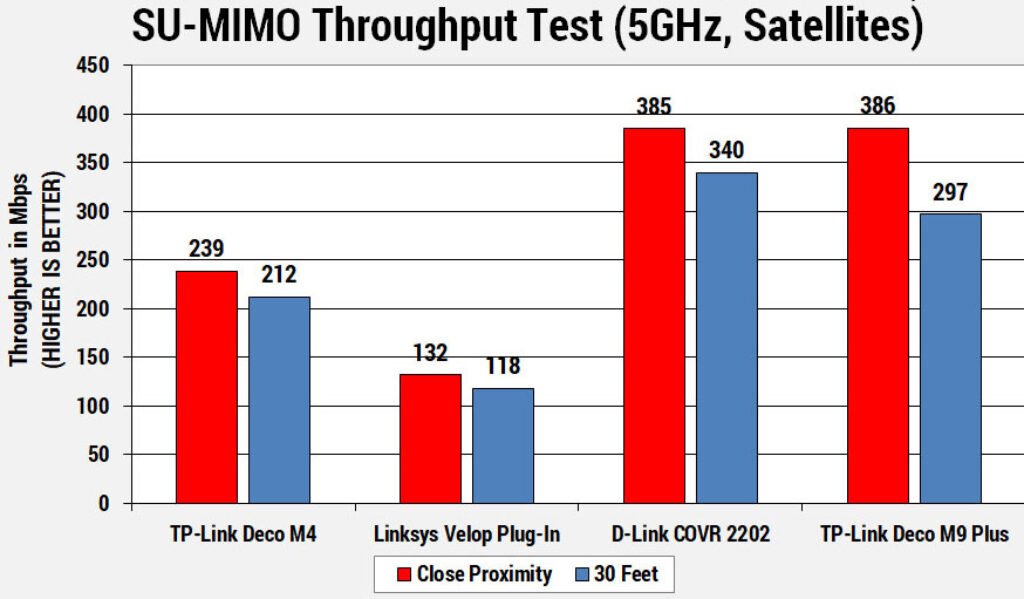
The Deco M4 satellite router was a strong runner-up in the close-range performance test, with a score of 239Mbps, easily ahead of the Linksys Velop satellite router (132Mbps) but a good bit behind both the D-Link COVR 2202 (385Mbps) and Deco M9 Plus (386Mbps). Results were similar at 30 feet (about 9 metres) where the Deco M4 also notched 212Mbps, besting the Velop (118Mbps) but falling short of the Deco M9 Plus (297Mbps) and COVR 2202 (340Mbps).
TP-Link Deco M4 Setup
The TP-Link Deco M4 is incredibly easy to setup, requiring no more than three minutes from start to finish. The TP-Link Deco is the simplest mesh router system I’ve ever installed. The app’s built-in guide is clear and concise, making the installation process swift. See the GIF below – I finished setup in under three minutes!
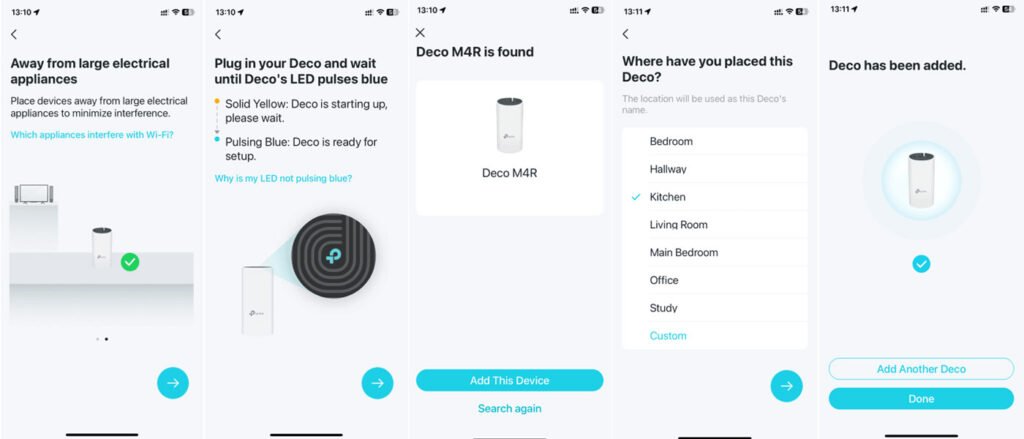
To ensure reliable device pairing, I recommend pairing units when they are close together, then repositioning them to their desired locations once pairing is complete.Alternatively, you may position the unit first and then verify its pairing capability with the main unit. Should pairing errors occur, this may indicate an unsuitable location.
TP-Link Deco M4 Firmware
The TP-Link Deco M4 offers fundamental functionality, as expected for its affordable price point. It retains essential QoS capabilities, allowing prioritisation of specific devices.Notably, the parental controls feature, labelled “Homecare” here, remains intact. It retains the same granular control over content restrictions and usage time limits for specific devices. The content restriction function comes with a preset range of parameters. Deco M4 can also generate monthly reports on device usage and data consumption, summarising the most visited websites and providing insights into those with the longest access times. Administrators can easily block any website.
For network capabilities, the Deco M4 supports DHCP address reservation and port forwarding. They also offer free TP-Link DDNS service. The TP-Link Deco M4 works as a router and as a Mesh access point. It also provides wired backhaul for higher network speed. WiFi features include MAC address blocking and a guest WiFi network.
TP-Link Deco M4 Verdict

TP-Link Deco Whole Home Mesh WiFi System – Up to 5,500 Sq.ft. Coverage, WiFi Router/Extender Replacement, Gigabit Ports, Seamless Roaming,...
 Amazon.com